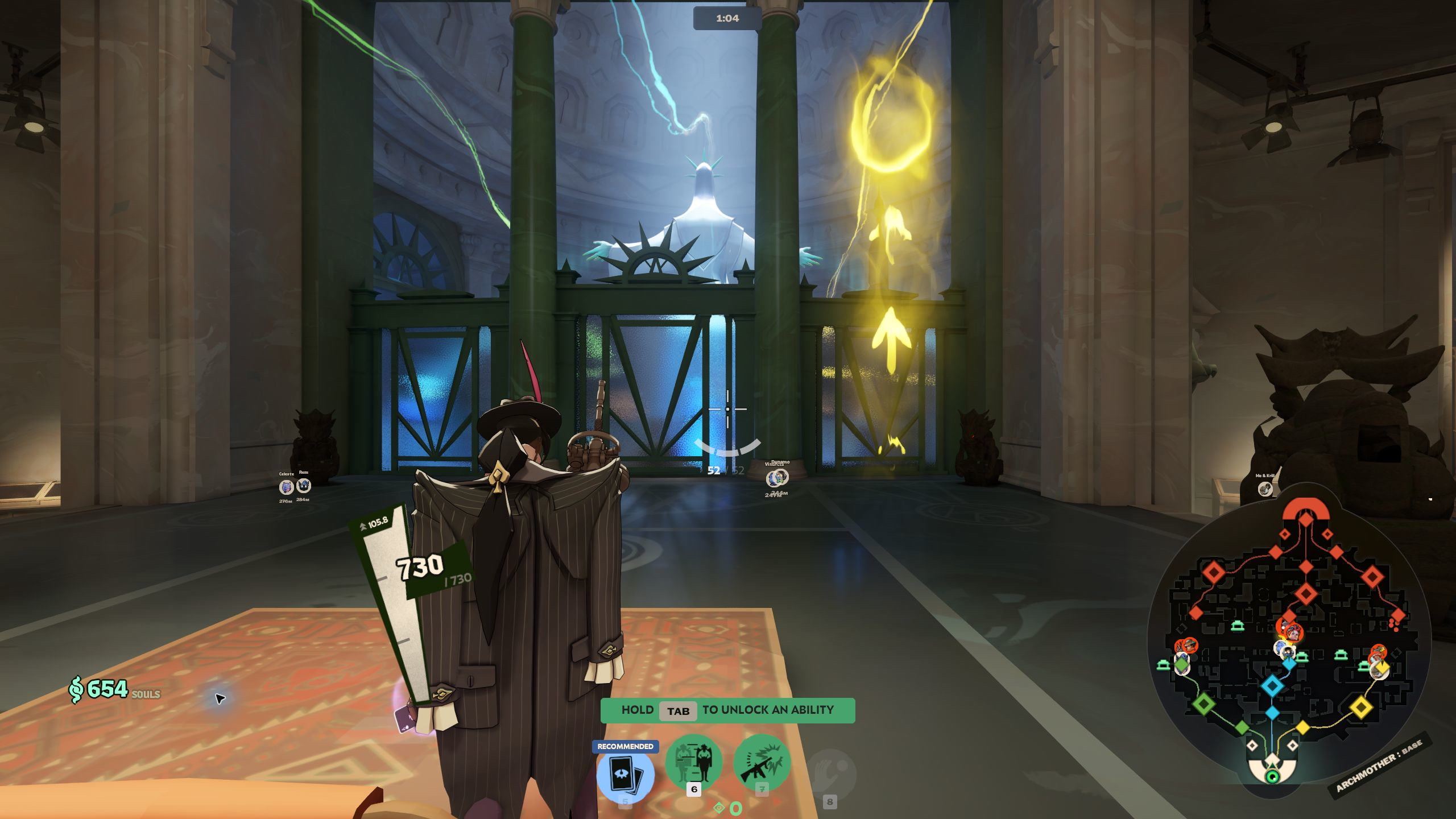
About this mod
A calmer Deadlock HUD: combat essentials stay visible, and Tab brings back the full overview for about five seconds after release.
Work in progress: Quiet HUD is still being tested and tuned. Expect updates, and please report anything that looks off in the comments. Quiet HUD gives the action more room while keeping the information you need to play close at hand. The top player portraits, team totals, detailed inventory and stats, and objective overview stay tucked away until you need them. Press Tab to bring back the full portrait row and the rest of the overview. Release it, and everything stays visible for about five seconds before fading away. A quick tap is enough for a glance at the whole match. Prefer another key? Add a second key to Scoreboard in Deadlock's key settings. It gives you the same overview and five-second linger while keeping Tab available. Health and shields, ammo and reload, the crosshair, stamina, abilities and their cooldowns, equipped active items and their cooldowns, and hero resource meters stay available. Your spendable souls also remain visible in this build. The mod leaves the clock and minimap alone, including the game's own behavior when opening the shop or changing modes. Shop, targeting, death, status effects and other context-sensitive prompts still appear when needed. Outside the overview, a text message reveals only its sender's top portrait for about five seconds. Voice chat reveals only the speaker's portrait, with about a two-second linger after they stop talking. Each player has a separate timer; typing, pings and chat-wheel lines don't reveal the row. Tab always brings back everyone together. The same HUD rules apply to every hero, with no per-hero setup. This private test build was rebuilt for Deadlock client 6790. Game updates may require a new version. This is a cosmetic HUD mod. It changes how information is displayed; it is not a promise of Valve approval or protection from bans. InstallingWith Deadlock Mod Manager installed, use this file's 1-Click Install button on GameBanana and enable the mod. If the private submission cannot be downloaded through the manager, download the ZIP from the private page and use the manager's local-file import. For an existing manual mod setup with addon loading enabled, extract pak43_dir.vpk into Deadlock/game/citadel/addons/. If that filename is already used by another mod, choose an unused pakNN_dir.vpk filename instead of replacing it. Install only one copy of Quiet HUD. Other mods that change the same HUD files may conflict. Private test notesThe v06 bot-match check confirmed the hidden idle HUD, full Tab overview and five-second linger. This is an early private test, not an all-heroes certification: remote text/voice attribution, a second Scoreboard key and all resolutions still need player testing. Screenshots are original, unedited 5120 × 1440 captures. The idle and Tab views show v06; the text-chat example is from v04, and the second bot-match overview is from v05.
The people behind it
- biggestdeadlockhater Creator